
Key Mapper
Screenshots
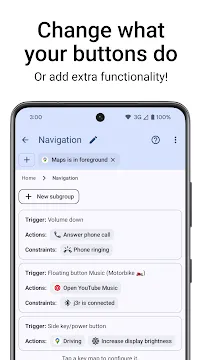
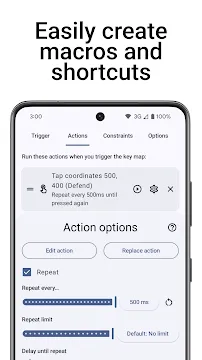
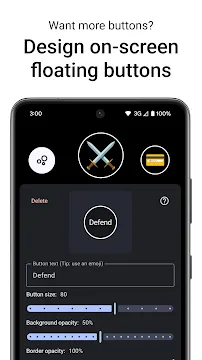
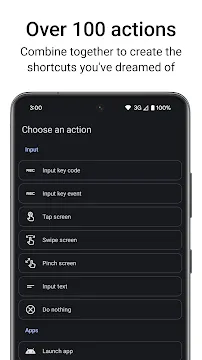
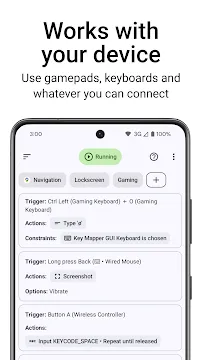
Key Mapper changes how you interact with your mobile device. You can customize hardware buttons to perform specific tasks. For example, you can change your volume keys easily. Many people want more control over their mobile devices. Therefore, Key Mapper provides an excellent option for custom button configurations. You do not need root access for most standard features. However, some deep features might require extra setup steps.
Key Mapper gives you complete control over your physical inputs. Consequently, you can navigate your phone much faster than before. First, you download Key Mapper from the download page. Then, you can start setting up your custom shortcuts. It works well with many types of hardware buttons. For instance, it supports keyboards and remote controllers too. You will find the interface clear and easy to navigate. Thus, setting up your first shortcut takes only a few moments.
What is Key Mapper?
Key Mapper is an open-source utility for modern devices. It lets you change the actions of physical buttons. For example, you can trigger actions with a double press. You can also use long-press gestures to open specific tools. Many users install Key Mapper to fix broken physical buttons. Therefore, you can prolong the lifespan of your physical hardware. In addition, Key Mapper supports external hardware components.
Here are a few compatible devices:
- Bluetooth keyboards
- Wired gamepads
- External remote controls
- Fingerprint scanners
Then, you can remap those keys to do anything you want. This feature helps mobile gamers significantly. However, general users also benefit from these features. You can map a button to turn on the flashlight. Alternatively, you can open your favorite messaging tool instantly. The main goal is to make your phone more accessible. Because Key Mapper runs in the background, it responds instantly to your inputs. You will enjoy a smoother mobile experience with this setup.
Core Features of Key Mapper
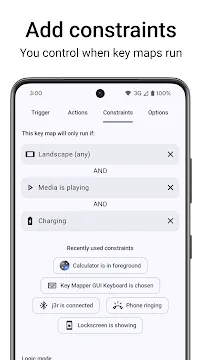
Key Mapper contains many options for users who love device customization. First, it allows the combining of multiple button presses. You can press volume up and volume down together. Then, Key Mapper executes a specific command of your choice. Second, you can set constraints for your actions. This is useful for preventing accidental activations.
For example, an action might only work under certain circumstances:
- When the screen is fully turned on
- While your device connects to headphones
- When a specific program runs on screen
- While the device vibrates
This prevents accidental triggers inside your pocket. Third, Key Mapper handles complex system tasks easily. You can map a button to change your brightness level. Furthermore, you can use keys to simulate screen taps. This is helpful for games that require fast repetitive actions. Because the interface is highly detailed, you can fine-tune every parameter. Therefore, you get a personalized layout that fits your routine.
How to Remap Buttons Easily
Configuring your hardware keys does not require technical expertise. First, you open Key Mapper on your mobile device. Then, you tap the large plus icon to create a new trigger. Key Mapper will prompt you to press the physical button you want to change. For instance, you can press the volume down key once. The app records this input immediately as the primary trigger.
Next, you must choose an action for this specific button. You can pick from a large list of options. Here are common actions you can map:
- Taking a quick screenshot
- Opening the notification panel
- Toggling the flashlight
- Launching a specific browser
After that, you can add specific conditions if you need them. Finally, you save the new mapping rule. The rule becomes active immediately after saving. You can test the button right away to see if it works. If you want to change it later, simply edit the rule. This straightforward process makes customization quick and stress-free for everyone.
Advanced Triggers and Custom Actions
You can create complex combinations with Key Mapper. Beyond single clicks, you can use triple clicks or long presses. You can also combine different hardware buttons for unique shortcuts. For example, you can press volume up while holding the power button. This allows you to create secret shortcuts for private tasks.
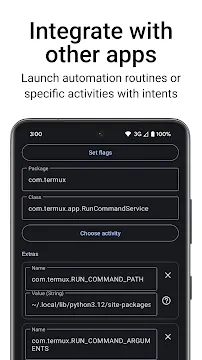
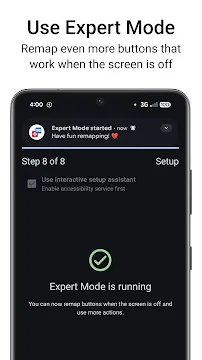
Furthermore, Key Mapper can trigger multiple actions with a single press. You can turn on Bluetooth and open your music player simultaneously. Consequently, you save time when preparing for an outdoor workout. Another advanced feature is the script execution option. Experienced users can run custom commands through the system terminal. However, you might need extra permissions for these automated tasks. The app guides you through the activation process carefully. Therefore, you can expand your device capabilities safely without any risks. You will find endless possibilities once you explore these features.
Why You Need Key Mapper
Many mobile devices lack native options for custom buttons. Manufacturers often lock the functions of specific hardware keys. For instance, some phones have a dedicated assistant button. You might prefer to use that button for a different purpose. Therefore, Key Mapper solves this issue by unlocking your hardware potential. You can repurpose unwanted buttons to fit your exact needs. This changes your daily device usage for the better.
In addition, This app helps individuals with physical difficulties. Consider these accessibility improvements:
- Easier navigation with one hand
- Quick access to emergency tools
- Less strain on weak fingers
- Custom shortcuts for navigation
Then, you can perform top-screen actions with ease. It makes device operation inclusive and highly comfortable. Because it values user privacy, The app does not require internet access. Your button layout and data remain completely safe on your phone. Thus, you get security alongside excellent device customization.
Note: Key Mapper focuses entirely on local execution to protect your private data from external leaks.
Conclusion
Key Mapper offers a comprehensive way to control your hardware keys. You can transform useless buttons into valuable shortcuts. The step-by-step setup process makes configuration easy for everyone. Furthermore, the advanced constraint options ensure high accuracy during usage. You do not have to worry about accidental button activations. Therefore, you can build a system that works perfectly for you.
Whether you want to fix broken buttons or speed up navigation, The app helps. It respects your privacy while providing deep customization options. You should download Key Mapper to experience true control over your device. Start creating your custom shortcuts today to improve your daily workflow. You will notice the difference in speed immediately.